


Notepad - Notes and Notebook
4.08.38K Reviews
App Specs
- Version
- 1.55
- Updated On
- License
- Free
- Downloads
- 10,000,000+
- Developer
- notes
- Categories
- Tools
- Platform
- Android
Screenshots
 Analysis by AppCompare
I like a note-taking app best when it helps me capture a thought before it disappears, then lets me find it later without turning note-making into another chore. That is the useful idea behind Notepad - Notes and Notebook: a practical place for everyday writing, lists and reminders, with a few extras for people who want more than a blank page. Its appeal is straightforward, though I would not treat it as a replacement for a full project manager or a secure vault.
A small tool for everyday capture
This is a free tools app from the developer notes, and its focus is easy to understand: make it simple to record things you need to remember. It suits quick notes, to-do lists and grocery planning especially well. The app has an average rating of 4.1 from around 67,000 ratings, and more than 10 million installs, so it has clearly found an audience among people looking for a familiar digital notepad rather than a complicated workspace.
It is rated for everyone, runs on Android 10 or later, and its current version is 1.53. Those details make it relevant to a broad range of Android users, but they do not change the basic decision: this app is most compelling if you want to get a thought down quickly and keep ordinary information in one place.
Why Notepad - Notes and Notebook Stands Out
Right off the bat, Notepad - Notes and Notebook is your quintessential note-taking app. But don’t let its simplicity fool you. This app has quite a few nifty features up its sleeve. It's designed with the user in mind, making it easy-peasy to navigate and use.
Easy Organization
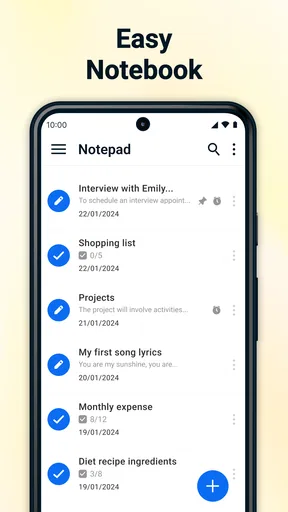
One thing I absolutely love about this app is how it lets you organize your notes. You can create folders to categorize your notes. It's like having a digital filing cabinet without the clutter of papers. If you're as scatterbrained as I am, this feature will be your new best friend.
Not to mention, the search function is a lifesaver. Just type in a keyword, and bam! There’s your note. No more endless scrolling or frantic swiping.
A useful habit is to choose a few folder names you will actually remember, such as “Home,” “Work” and “Ideas,” rather than making a new folder for every small topic. Search can rescue a note when its location slips your mind, but consistent naming makes browsing calmer when you are in a hurry. I also find it helps to put the key detail near the beginning of a note: “Passport renewal” is easier to scan than a long paragraph that only explains its purpose halfway through.
Worth Reading Before You Choose

Flipboard Shows What News Apps Must Do Beyond the Feed

Switching to Android Auto Means Rethinking Your Driving Routine

Google Calendar Makes a Crowded Week Easier to Manage

Ludo King Makes the Most of the Minutes Between Plans

Baby Panda World Brings Quick Play to Modern Phones, but Its Game Library Feels Busy

ESPN’s Live Game View Makes Following Close Games Easier
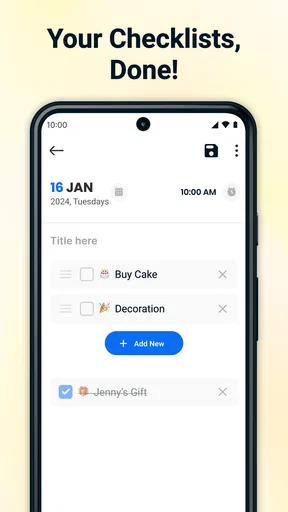
For a grocery run, I would keep a reusable shopping note and update it as things run out, rather than starting from scratch each time. A checklist makes the trip easier to work through, while a separate folder for household notes stops recipes or errands from getting mixed in with work reminders. That simple division is more valuable than elaborate organization if your main goal is to find something quickly.
Customization Galore
Another feature that caught my eye is the customization options. You can change the color scheme of your notes, making it not only functional but also a bit fun. It's like dressing up your notes in a snazzy outfit.
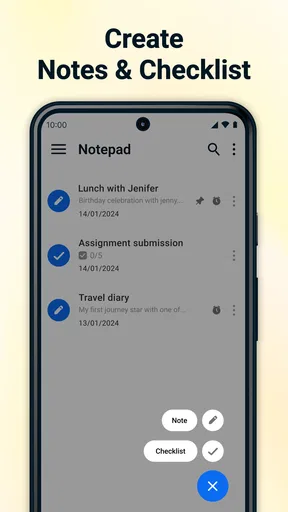
Plus, if you're a fan of lists (who isn’t?), the app lets you create checklists. There's no better feeling than ticking off a completed task. Seriously, try it. It’s oddly satisfying.
Color is most useful when it carries a consistent meaning. I would use one shade for personal planning and another for household lists, for example, instead of changing colors just for decoration. That gives a quick visual cue without relying on memory alone. The trade-off is that colors only help if you apply them consistently; if every note gets a different shade, the visual system stops doing much work.
Seamless Syncing Across Devices
Here's where it gets even better: the syncing feature. You can access your notes across all your devices. Whether you're on your phone, tablet, or computer, your notes are just a click away. It's perfect for when you're on the move or switching between gadgets.
Forget to save? No worries! The app automatically saves your work as you go, so no more panic attacks about losing your precious notes.
For a realistic routine, I might jot down a few groceries while making breakfast, then check the list at the shop and add a note about something the household is running low on before heading home. Automatic saving makes that kind of stop-and-start use feel natural. Syncing is useful when you genuinely move between devices, but I would still check that the notes I need are available on the device I plan to use before relying on them in an important moment. A note app is most dependable when the capture habit is simple and the retrieval habit is deliberate.
People often ask whether this is a good choice for someone who wants notes on more than one device. It can be useful for that purpose, as the app offers syncing, but I would not make it the sole home for time-critical information without first trying the workflow on my own devices. For a quick reminder or a list, the stakes are low; for a deadline or travel detail, I would also place a reminder in a calendar or another tool designed to alert me.
Security at Its Best
If you're like me and have a few sensitive notes you'd rather keep private, the app has got you covered. It offers password protection, so you can keep your secrets safe from prying eyes.
I would use password protection for casual privacy, such as keeping a personal note from being opened by someone browsing my phone. I would not treat it as a reason to store passwords, payment details or other high-risk information here. For those, a dedicated password manager is the better fit because its central job is handling credentials. This distinction matters: a lock on a note can be handy, but it does not turn a general notepad into a specialist security tool.
Simple and Intuitive Design
Now, let’s talk about the design. The interface is clean and straightforward. There are no unnecessary bells and whistles, which I appreciate. It's all about getting the job done without distractions.
"The app is like having a trusty notebook, minus the paper cuts."
That directness is a strength when I need to write something down in seconds. It is also the point where some users may want more. If you need detailed project boards, shared team editing, linked documents or structured databases, a richer workspace app will likely serve you better. Compared with a paper notebook, this app gives you searchable text and editable lists; compared with a large digital workspace, it asks less of you but also offers a narrower way to organize information.
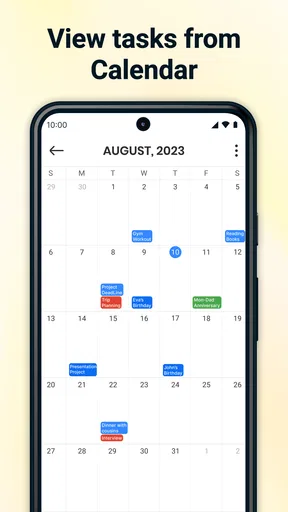
There is a practical middle ground between those alternatives. I would keep durable reference notes and ordinary lists here, while using a calendar for appointments and a dedicated task manager when a job needs a due date, recurring schedule or a sequence of steps. Splitting tools this way avoids expecting one small notepad to manage every part of a busy life.
Offline Access
Worried about losing access to your notes when you’re not connected to the internet? Fear not! The app works offline, so you can continue writing that novel or jotting down ideas no matter where you are.
Offline access is particularly useful for drafting a thought during a commute, in a building with weak reception or while travelling. My tip is to treat offline writing as capture first: make the note clear enough that you will understand it later, then sort it into the right folder when it is convenient. That keeps a temporary scribble from becoming permanently hard to find. If you depend on a note appearing on another device, reconnect and check the handoff rather than assuming an offline edit has already reached everywhere.
More Than Just Notes
One of the unexpected perks is the ability to add voice notes. Sometimes, it’s just easier to say things out loud, especially when your hands are full. And yes, you can add images too. It’s like having a mini scrapbook in your pocket.
Voice notes and images make the app more useful when typing would interrupt what you are doing. I might record a thought while carrying bags or save an image alongside a reminder about an item to buy. The trade-off is that a spoken clip or picture may be less searchable than a short text label, so I would add a few identifying words whenever possible. “Lamp measurements” is more useful beside a photo than relying on the picture alone to explain why I saved it.
This mix is best for personal reference, not for every kind of record. A student could keep quick lecture reminders and reading ideas here, but someone writing a long research project may prefer an app built for citations and document management. A busy household can share the habit of maintaining lists, while a group that needs assigned tasks and progress tracking will probably want a collaborative task tool. Choosing the right boundary keeps the notepad handy instead of making it carry responsibilities it was not designed around.
Who Will Get the Most from It
I would recommend this app to someone who wants an uncomplicated home for short notes, grocery lists, checklists and everyday reminders, especially if folders and search are enough organization. It is also a sensible option for people who like to combine typed notes with voice or image capture. If you mainly need a fast place to put information, the range of features feels useful without demanding a complicated setup.
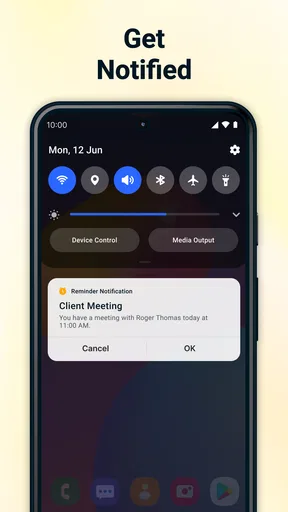
I would suggest looking elsewhere if you need robust collaboration, task assignment, calendar alerts, advanced document formatting or a specialized way to manage sensitive credentials. Those are not small preferences: they change what a note-taking tool needs to do. A paper notebook may even be better if you prefer handwriting and do not need search or access across devices. The right choice depends less on having the most features and more on whether the tool fits the way you already remember things.
Final Thoughts
All in all, Notepad - Notes and Notebook is a delightful app that marries simplicity with functionality. Whether you're a student, a professional, or just someone who loves keeping their life in order, it’s got something for everyone. It’s become my go-to for everything from brainstorming ideas to planning my week.
So, if you haven’t yet, give it a whirl. I promise, you’ll wonder how you ever managed without it!
Pros
- Intuitive user interface.
- Fast loading time.
- Offline functionality.
- Customizable themes.
- Secure note locking.
Cons
- Limited text formatting options.
- No cloud sync available.
- Ads can be intrusive.
- Lacks collaboration features.
- No voice note support.
FAQs for Notepad - Notes and Notebook
What features does Notepad - Notes and Notebook offer?
Notepad - Notes and Notebook provides a user-friendly interface for creating, editing, and organizing notes. Key features include text formatting tools, checklist creation, voice-to-text capabilities, and cloud syncing for backup and access across devices. It also offers password protection for sensitive notes, making it a versatile tool for personal and professional use.
Is Notepad - Notes and Notebook free to use?
Yes, Notepad - Notes and Notebook offers a free version that includes basic note-taking functionalities. However, it may have in-app purchases or a premium version that unlocks additional features such as advanced formatting options, ad-free experience, and enhanced cloud storage. Users can choose the version that best fits their needs.
How secure is my data on Notepad - Notes and Notebook?
The app prioritizes user data security with features like password protection for individual notes and secure cloud storage options. It typically uses encryption to safeguard your information. However, users should always review the app’s privacy policy and ensure they are comfortable with the data management practices before storing sensitive information.
Can I sync my notes across multiple devices?
Yes, Notepad - Notes and Notebook supports syncing across multiple devices. By signing into your account, you can access your notes on any device where the app is installed. This feature ensures seamless access to your notes whether you're using a smartphone, tablet, or computer, provided you have an internet connection.
Does Notepad - Notes and Notebook support multimedia content?
While primarily designed for text notes, Notepad - Notes and Notebook often supports adding multimedia content such as images and voice recordings. This enhances the note-taking experience, allowing users to capture more comprehensive information. Check the app’s specific features to confirm the types of multimedia content it supports.


